

Is Your Website Blocking ChatGPT? How to Check
Yes, your website can block ChatGPT without you ever deciding to, and it happens more often than people expect. If OpenAI’s search crawler, OAI-SearchBot, is refused by your robots.txt file, your CDN or your firewall, your pages will not be shown in ChatGPT search answers, no matter how good the content is.
I manage a large portfolio of business websites, and when an owner asks me why ChatGPT never mentions them, this is the first thing I check. It takes about ten minutes, and it rules out the one problem that makes every other AI search effort pointless. Here is how I do it.
Which OpenAI crawlers matter for showing up in ChatGPT?
OpenAI documents several crawlers, and they do different jobs. Mixing them up is the most common cause of an accidental block.
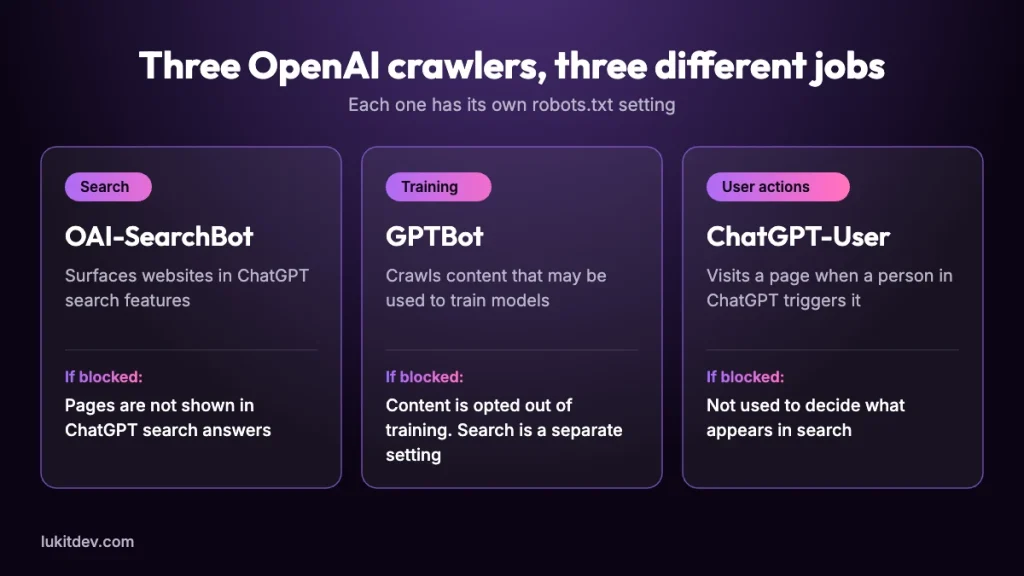
- OAI-SearchBot is the one that surfaces websites in ChatGPT’s search features. OpenAI’s documentation says sites that opt out of it will not be shown in ChatGPT search answers, although they can still appear as navigational links.
- GPTBot crawls content that may be used to train OpenAI’s models. Disallowing it is how you opt out of training.
- ChatGPT-User is used when a person in ChatGPT triggers a visit to a page, for example by asking a question about it. It is not an automatic crawler, and OpenAI says it is not used to decide whether content appears in search.
There is also OAI-AdsBot, which only checks landing pages submitted as ChatGPT ads, so most sites can ignore it.
The useful detail is that each robots.txt setting is independent. You can keep your content out of model training and still be eligible for ChatGPT search answers by disallowing GPTBot and allowing OAI-SearchBot. Plenty of sites did the opposite by accident. At some point someone pasted a “block all AI bots” list into robots.txt, the list included the search crawler, and nobody looked at the file again.
Where do accidental blocks come from?
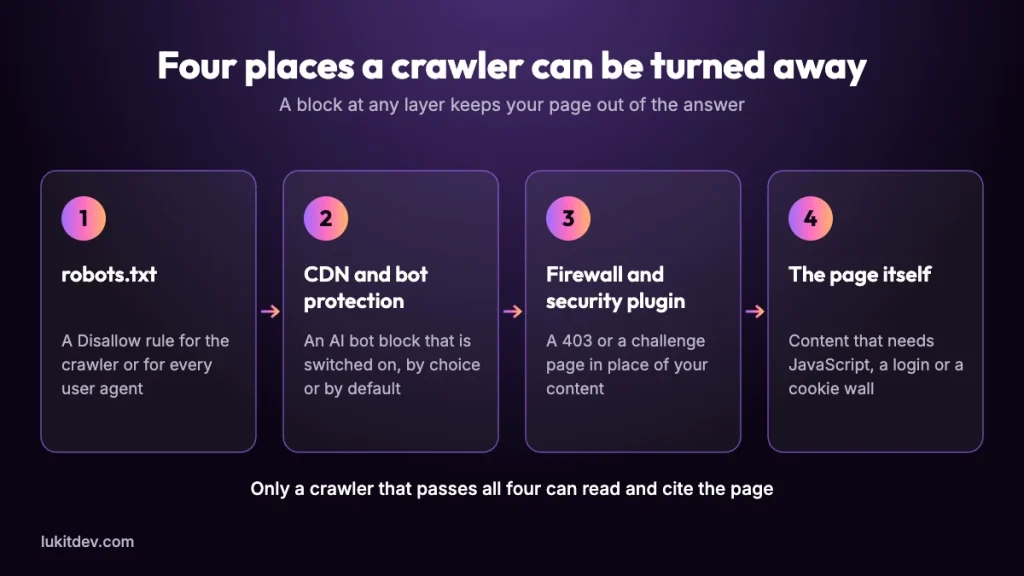
A crawler has to get through several layers before it reads a page, and any one of them can turn it away. The block is rarely where the owner expects it to be. Picture an accounting firm whose robots.txt is perfectly clean, while a firewall rule added during a spam attack two years earlier quietly refuses every automated visitor.
robots.txt. This is the polite layer. Look for a group that names OAI-SearchBot followed by Disallow: /, and also for a blanket rule under User-agent: * that disallows everything. A staging site’s robots.txt copied to production is a classic way for that to happen.
Your CDN or bot protection. Cloudflare has a one-click “Block AI bots” option, and in July 2026 it announced separate controls for three kinds of AI traffic: Search, Agent and Training. Under the defaults it announced for new domains from September 15, 2026, Training and Agent traffic is blocked on pages that display ads, while Search stays allowed. Cloudflare gives ChatGPT-User as an example of Agent traffic. If your site was set up by an agency or a previous developer, do not assume you know which of these options is on. Open the Security settings for the domain and look.
Security plugins and host firewalls. WordPress security plugins and managed hosts often rate limit or challenge traffic that looks automated. A crawler that receives a 403 or a challenge page instead of your content is blocked just as surely as one disallowed in robots.txt, and nothing in robots.txt will tell you.
The page itself. If the main content only appears after JavaScript runs, or sits behind a login or a cookie wall, a crawler that reads the raw HTML gets through and still finds nothing to quote.
How do I check my own site in ten minutes?
- Read your robots.txt. Open yourdomain.com/robots.txt in a browser. Search the file for OAI-SearchBot, GPTBot and ChatGPT-User, then read the User-agent: * group, because a blanket disallow there applies to any crawler that is not named elsewhere in the file.
- Check the CDN. In Cloudflare, open the domain’s Security settings and review the AI bot options. Write down what is blocked and whether that was a decision or a default.
- Request a page as the crawler. From a terminal, request a page with a user agent that contains the crawler’s name:
curl -I -A "OAI-SearchBot" https://yourdomain.com/. A 200 is a good sign. A 403, a 503 or a challenge page means a rule is matching on the name. This only catches rules based on the user agent, so treat a pass as encouraging, not as proof. - Look at the server logs. This is the real answer. Search your access logs for OAI-SearchBot and look at the status codes it received. OpenAI publishes the IP ranges for each crawler as JSON files on openai.com, so you can confirm the visits are real. If the crawler has never shown up, go back over the layers above your server before assuming it is simply not interested.
- View the page source. Right click, choose View Page Source, and search for a sentence from the middle of your article. If it is not in the raw HTML, a crawler may not see it either.
What should I change if I find a block?
Decide what you want first. For most businesses that sell a service, the sensible position is to allow the search crawler and make a separate, deliberate choice about training. In robots.txt that looks like this:
User-agent: OAI-SearchBot
Allow: /

User-agent: GPTBot
Disallow: /
On WordPress you can edit robots.txt from your SEO plugin (Yoast SEO has a file editor under Tools) or by placing a real file in the site root. Then make the CDN and the firewall agree with it. A robots.txt that welcomes a crawler does nothing if a firewall rule refuses it one layer earlier.
OpenAI says a robots.txt update can take about 24 hours to be reflected for search, so do not expect an instant change. Run the curl test and check the logs again a few days later to confirm the crawler is getting a 200.
One caveat: removing a block makes you eligible, it does not make you recommended. ChatGPT still has to find your content useful and trustworthy enough to cite. That is the work I describe on my AI search optimization page, and I wrote about why technically clean sites still fail that test in The Invisible Wall: Why Your Technically Perfect Website is Failing the AI Audit. But none of it matters while the door is closed.
Frequently asked questions
Does blocking GPTBot remove my site from ChatGPT search?
No. GPTBot is the training crawler. OpenAI treats each crawler’s robots.txt setting independently, and the one that controls whether you are shown in ChatGPT search answers is OAI-SearchBot.
How long after I unblock OAI-SearchBot will ChatGPT show my site?
OpenAI says robots.txt updates take about 24 hours to be reflected for search. That only restores eligibility. Whether your pages are cited after that depends on the content and how well it answers the question being asked.
Can I allow ChatGPT search but keep my content out of AI training?
Yes. Allow OAI-SearchBot and disallow GPTBot in robots.txt, then check that your CDN and firewall settings match. The two robots.txt settings do not affect each other.

Lucas Alvarado — Senior marketing technology and web operations consultant. HubSpot, Salesforce, Pardot, and high-traffic WordPress for B2B revenue teams. Based in Miami, working with companies across the US.