

How to Track Calendly Bookings in GA4
If you send people to Calendly, GA4 will not record the booking unless you tell it to. There are two ways to fix that: track clicks on your Calendly links, or, if you embed Calendly on your page, listen for the event it sends when someone actually books.
I set this up on my own site recently and found that no lead actions were being recorded, even though Google Analytics was installed and collecting page views. That is common. Page views tell you people showed up. They do not tell you which page or channel produced a booked call, which is the number you actually spend money against.
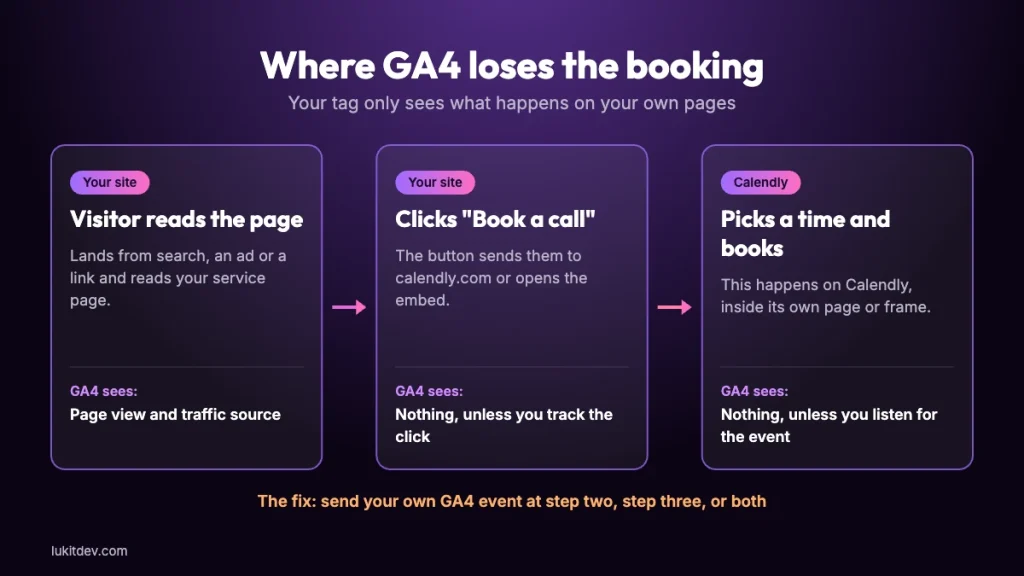
Why doesn’t GA4 see Calendly bookings on its own?
The booking happens on Calendly, not on your site. When a visitor clicks a link to calendly.com, they leave your domain and your GA4 tag stops seeing what they do. If you embed Calendly, the scheduler runs inside a frame that belongs to Calendly, so your tag still cannot see inside it.
Calendly does have a native GA4 integration. It sends events such as invitee_meeting_scheduled to a Measurement ID you connect, one per Calendly organization. It is worth turning on, but it reports what happens on Calendly’s pages. You still want an event on your own site so you can tie the booking to the page and campaign that sent the visitor.
Option 1: track clicks on Calendly links
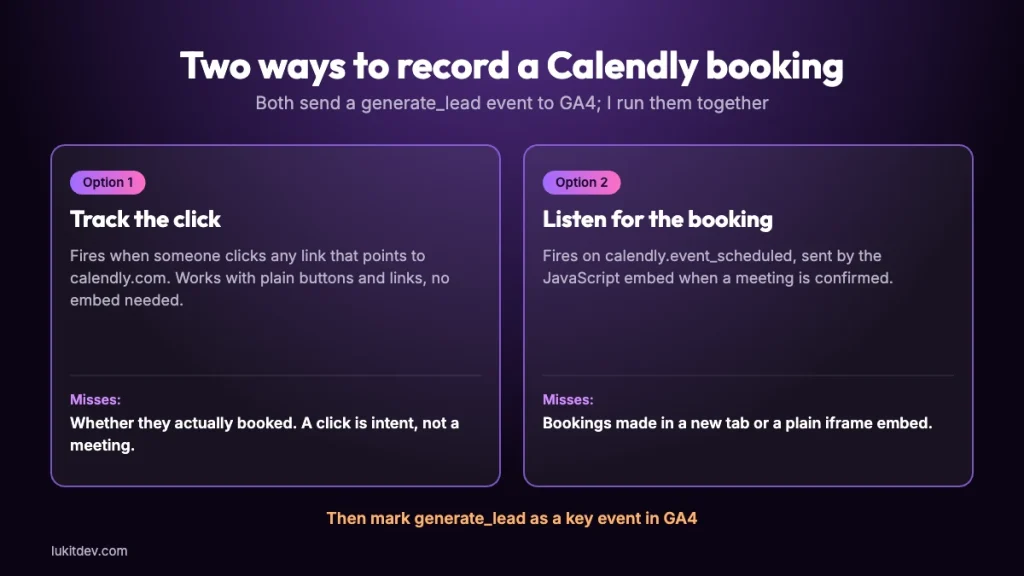
This is the simplest setup and works with any “Book a call” button that links out to Calendly. You fire a GA4 event when someone clicks a link whose address contains calendly.com.
I use generate_lead as the event name, because it is one of GA4’s recommended events for lead generation, and I add a parameter that says what kind of lead it was. A small script in the footer does the job:
document.addEventListener('click', function (e) {
  var a = e.target.closest('a[href*="calendly.com"]');
  if (a && typeof gtag === 'function') {
    gtag('event', 'generate_lead', {
      lead_type: 'calendly_click',
      page_path: location.pathname
    });
  }
}, true);
On WordPress I add this with a code snippets plugin instead of editing the theme, so it survives theme updates. The same listener can catch tel: and mailto: links with a different lead_type.
The limit: a click is intent, not a booking. Some people open Calendly and never pick a time. Treat this number as a leading indicator.
Option 2: listen for the embed’s scheduled event
If you use Calendly’s inline or popup embed (the JavaScript widget, not a plain iframe), Calendly sends messages to your page with window.postMessage as the visitor moves through it. The events include calendly.event_type_viewed, calendly.date_and_time_selected and calendly.event_scheduled. Calendly’s documentation notes that a plain iframe embed does not send them.
window.addEventListener('message', function (e) {
  if (e.origin !== 'https://calendly.com') return;
  if (e.data && e.data.event === 'calendly.event_scheduled'
      && typeof gtag === 'function') {
    gtag('event', 'generate_lead', {
      lead_type: 'calendly_booked',
      page_path: location.pathname
    });
  }
});
Checking the origin matters. Without it, any frame on the page could post a fake event.
This is the better signal because it only fires when a meeting is actually scheduled. The trade-off is that you lose it when someone opens Calendly in a new tab instead of booking inside the embed, so I run both.
How do I make it count as a conversion?
- In GA4, go to Admin, then Events, and mark generate_lead as a key event. If the event has not fired yet, create it by name first.
- Register lead_type and page_path as custom dimensions. GA4 does not show custom parameters in standard reports until you do.
- Click your own button once and confirm the event shows up in the Realtime report.
- If you run Google Ads, import the key event so bidding can use it.
What should I check every week?
Three numbers: leads by landing page, leads by traffic source, and the calls that actually closed, which you will have to keep outside GA4. The first two show which pages and channels produce bookings. The third tells you whether those bookings turn into revenue, which is the only reason to track any of this.
If you want the closed deals to flow back from your CRM too, that is the kind of work I do on the marketing automation and lead tracking side. If your leads are showing up as Direct, start with why leads show as Direct in GA4.
Common questions
Does Calendly’s GA4 integration replace this?
Not fully. It reports what happens on Calendly’s pages. Tracking on your own site ties the booking to the page and campaign that sent the visitor, so I use both.
Will ad blockers stop these events?
Some will, because they block the GA4 tag itself. Expect GA4 to undercount, and compare it against the bookings in your Calendly account each month.
Do I need Google Tag Manager for this?
No. If GA4 is already on the page through gtag.js or Site Kit, a small script is enough. Tag Manager earns its place once you track many events across several tools.

Lucas Alvarado — Senior marketing technology and web operations consultant. HubSpot, Salesforce, Pardot, and high-traffic WordPress for B2B revenue teams. Based in Miami, working with companies across the US.