

Why Do My Leads Show as Direct in GA4?
If most of your leads show as Direct in GA4, it almost never means those people typed your address into a browser. It means GA4 received the visit with no referrer and no campaign tags, so it had nothing to credit, and Direct is the label it uses when it does not know.
I manage a large portfolio of business websites, and this is one of the most common questions I hear from marketing directors. Money is going out through paid search, email and social, and the report says half the leads came from nowhere. Here is how I work through it.
What does Direct actually mean in GA4?
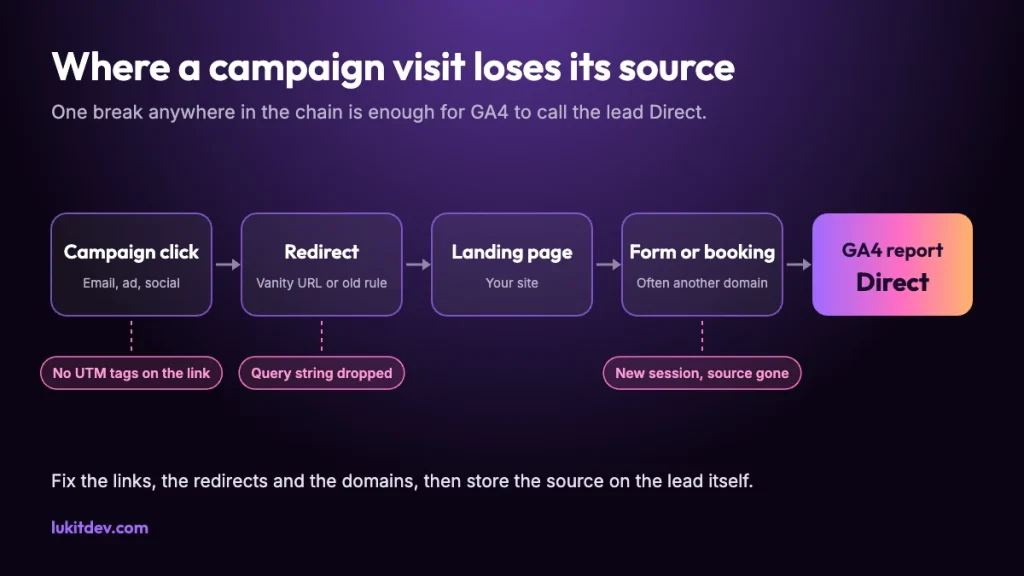
GA4 decides where a session came from using two things: the referrer the browser sends, and the campaign parameters on the landing URL, meaning UTM tags or a Google Ads click ID. When both are missing, the session is Direct.
One detail matters here. GA4 does not give up easily. If the same visitor arrived earlier from a source it could identify, GA4 will usually credit that earlier source instead of Direct. So a lead that still shows as Direct is one where GA4 has no usable history for that browser at all.
Why do real campaign visits lose their source?
In my experience it comes down to a short list.
- Untagged links you control. Links in email, SMS, PDFs, QR codes and desktop or mobile apps often send no referrer. If the link has no UTM tags either, the visit is Direct.
- Redirects that drop the query string. A vanity URL, an http to https hop or an old redirect rule can strip the tags before the page loads.
- A form, booking tool or checkout on another domain. Think of a scheduling tool for a dental office or a checkout for an online course. The visitor leaves your site, comes back to a thank you page, and the session picks up the wrong source or none.
- A messy tag setup. Google’s own guidance warns that events fired before the Google tag is configured can break session data and inflate Direct and (not set). I see this most when a tag is pasted into the theme by hand and a plugin adds a second copy.
- AI assistants. Google added an AI Assistant channel to GA4 in 2026, which catches visits that arrive with a recognizable referrer or tag from tools like ChatGPT. A link opened from an app or pasted into a browser can still arrive with nothing and land in Direct. I wrote more about how these tools read a site in The Invisible Wall: Why Your Technically Perfect Website is Failing the AI Audit.
One thing that does not cause Direct: a consent banner that blocks the Google tag until someone accepts. Visits from people who decline are missing from GA4 rather than labeled Direct. That is a separate gap.
How do I find out how much of my Direct is real?
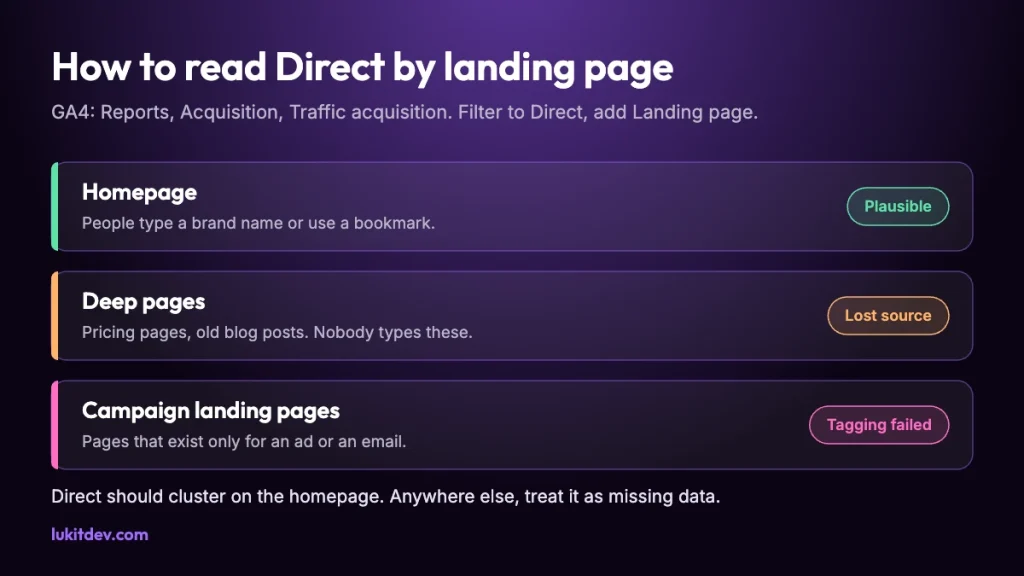
Open Reports, then Acquisition, then Traffic acquisition. Filter Session default channel group to Direct and add Landing page as a secondary dimension. Then read the list like this:
- Homepage. Plausible. People do type a brand name or use a bookmark.
- Deep pages. A pricing page, a three year old blog post, a location page. Nobody types those addresses. This is lost source data.
- Campaign landing pages. If a page only exists for an ad or an email and it shows Direct sessions, your tagging failed somewhere.
Run the same view against the key event you use for leads, such as a form submission. That tells you how many leads are affected, not just how many sessions.
How do I fix it?
I go in this order, because the early steps are cheap and the later ones protect you when GA4 is still wrong.
- Tag every link you control. Email, SMS, QR codes, PDFs, social profiles, partner listings. Keep one shared sheet with the naming rules, all lowercase, and use utm_source, utm_medium and utm_campaign every time. Never put UTM tags on links between your own pages, because that replaces the real source.
- Test your redirects. Paste a tagged URL for each vanity address and old redirect into a browser. If the tags are gone from the address bar when the page loads, fix the rule in WordPress, at the host or in Cloudflare so the query string passes through.
- Tell GA4 about your other domains. In Admin, open Data streams, pick the web stream and click Configure tag settings. Use Configure your domains for sites you own that share the same tag. Use List unwanted referrals for payment processors and booking tools that send people back to you.
- Clean up the tag. One Google tag, loaded once, configured before any events fire. On WordPress, check the theme header, the plugins and Tag Manager for duplicates.
- Capture the source on the lead itself. Store the first UTM values, the click ID, the referrer and the landing page in a first party cookie, then pass them into hidden form fields that map to HubSpot or Salesforce properties. Now the CRM record carries its own source, even when GA4 has it wrong. This matters in HubSpot especially, where contacts created through an integration or API without the tracking cookie tend to land in Offline Sources, which is the same problem under a different label.
- Cover phone calls. A call tracking tool such as CallRail swaps the number on the page based on the visitor’s source, so calls carry a source the same way forms do.
Steps five and six are the core of the marketing automation and lead tracking work I do. GA4 is useful for trends, but the record you make budget decisions from should live in the CRM, attached to the lead and later to the revenue.
What should I expect after the fixes?
Direct will not go to zero, and it should not. Returning customers, word of mouth and bookmarks are real. What you want is for Direct to concentrate on the homepage and a few brand pages, and for every new lead in the CRM to have its source fields filled in.
GA4 does not go back and reprocess old sessions, so write down the date you made each change and compare from that date forward. Give it a few weeks before judging, since returning visitors keep their old history for a while.
FAQs
How much Direct traffic is normal in GA4?
There is no reliable benchmark, because it depends on how well known the brand is and how much traffic comes from email and apps. Judge it by landing page instead. Direct visits to the homepage are believable. Direct visits to deep pages are usually lost source data.
Does traffic from ChatGPT show as Direct in GA4?
Sometimes. Visits that arrive with a ChatGPT referrer or tag are identified, and GA4 now has an AI Assistant channel for them. Visits from links opened in an app or pasted into a browser can arrive with no source and are counted as Direct.
Can I fix the source on leads that already came in as Direct?
Not in GA4. It does not reprocess past sessions, so fixes only apply going forward. In the CRM you can correct individual records by hand when you know where a lead came from, which is worth doing for closed deals.

Lucas Alvarado — Senior marketing technology and web operations consultant. HubSpot, Salesforce, Pardot, and high-traffic WordPress for B2B revenue teams. Based in Miami, working with companies across the US.